
Getting Started Guide
This guide walks you through the process of setting up LinkedIn for Workflows inside your CRM.
By the end, you will have:
Installed the LinkedIn for Workflows snapshot
Connected your LinkedIn account to the app
Configured the chat
Configure custom values and workflows to start enriching leads and managing LinkedIn outreach directly within your CRM
Here is a spreadsheet with further explanation on the included assets and a setup checklist you can copy and work through. You can also see a full overview of the workflows and included assets in this board.
Snapshot Overview

LinkedIn For Workflows Snapshot V3 Overview Watch Video
STEP 1: Install App from the App Marketplace (If not done so already)
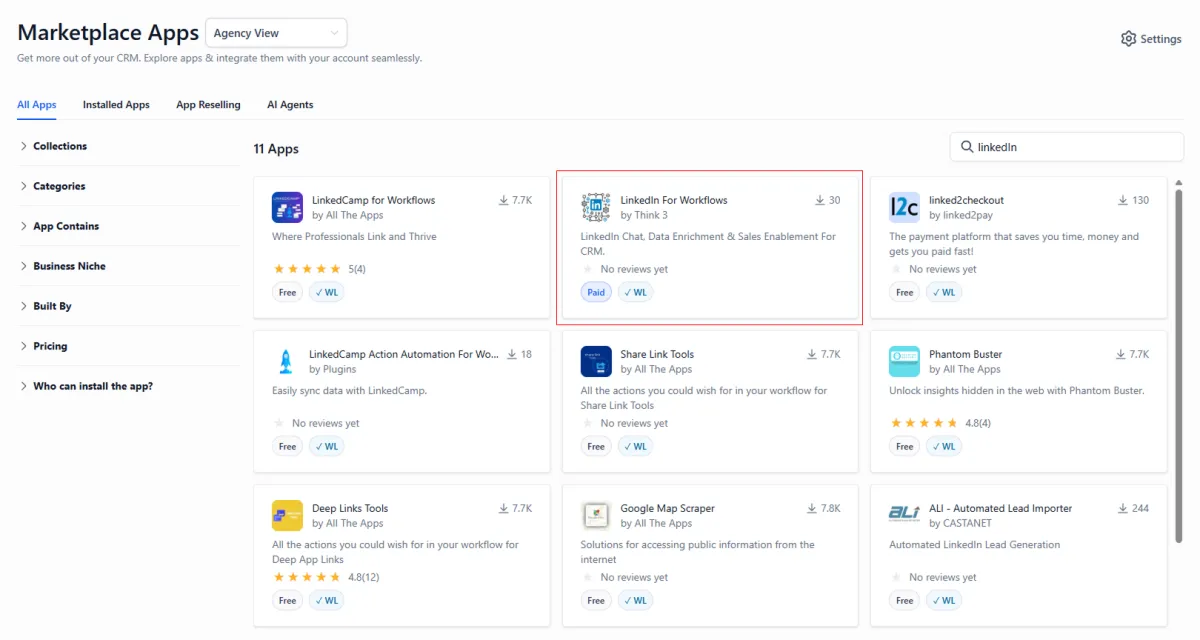
If you haven't done so already you need to install the app from the app marketplace. Install Link.
STEP 2: Install Provided Snapshot Into Agency Account
How to Install Snapshots Watch Video
Install the snapshot:
Click the snapshot installation link and import it into your agency account.
Snapshot with AI Messaging GPT Actions:
https://affiliates.gohighlevel.com/?fp_ref=think3&share=ekptETh1WsxJ1eNkMchu
Figma Board:
Snapshot without AI Messaging GPT Actions:
https://affiliates.gohighlevel.com/?fp_ref=think3&share=MdH4E40uM9vqVhafuyPn
Figma Board:
STEP 3: Connect LinkedIn Account & Provider & Chat ID
How to Connect LinkedIn and Chat IDs Watch Video
STEP 4: Set Custom Values Fields
Configure Custom Values Watch Video
STEP 5: Activate Triggers in Workflows 1A: New LinkedIn Connection & 1B: New Message
Activate Workflow Triggers Watch Video
STEP 6: Set LinkedIn Enrich Trigger in Workflow 2B: Start (Profile Enrich Bulk)
Set Triggers For Profile Enrichment Workflows Watch Video
STEP 7: Set LinkedIn Outreach Trigger in Workflow 3A: Start (LinkedIn Outreach)
Set Triggers for LinkedIn Engagement Workflows Watch Video
STEP 8: Set InMail Account Type in Workflow 3G: LinkedIn Outreach (InMail)
Set InMail Account Type for InMail Outreach Workflow Watch Video
STEP 9: Set InMail Account Type Variable in Workflow 5A: Check InMail Credit Balance
Set InMail Account Type Variable for InMail Credit Balance Check Watch Video
STEP 10: Review AI Message Templates and Refine Prompts
Review AI Messaging and Message Templates Watch Video
In order to ensure your prompts are producing adequate responses you will need to conduct thorough testing with your prompts combined with different variable combinations. You can use a tool such as TuneMyPrompts to test different prompt variations and models. Here is a brief overview.
STEP 11: Test Thoroughly by Running Contacts Through the Entire System
Important Links
Documentation: https://linkedinforworkflows.com/
Rate Limit Requirements: Review LinkedIn’s usage guidelines and rate limits to prevent account disconnections. https://linkedinforworkflows.com/rate-limits/
Glossary: See definitions of key LinkedIn For Workflow terms. https://linkedinforworkflows.com/glossary/
Need Help? Book a Customer Success Call
If you need assistance setting up or customizing LinkedIn for Workflows:
Book a Customer Success Call to:
Discuss your use case
Get expert configuration guidance
Accelerate your onboarding process